Cooling Fan for Welding Machine: Selection and Common Failures
Published: Author: Rachel
A welding machine that trips its thermal cut-out near the end of a shift is usually not a failed welder. It is a welder whose cooling fan for welding machine service has quietly degraded for months — a bearing running dry, a filter mat matted flat, a fan spinning at half speed — until the margin between normal running temperature and the trip point finally closed.
Because the fan is the cheapest part in the machine and the first to age, it is also the part most often replaced without a spec sheet in hand. Fit the wrong voltage, bearing or rotation and the welder will run, sound fine, and overheat again in weeks.
This guide is written for the people who open the case: service technicians, welding-equipment builders, and maintenance crews on a production line. It maps what generates heat inside a welder, what makes forced air cooling unavoidable at high current, how to read the internal air path, how to specify a replacement, and the failures that reach the bench most often.
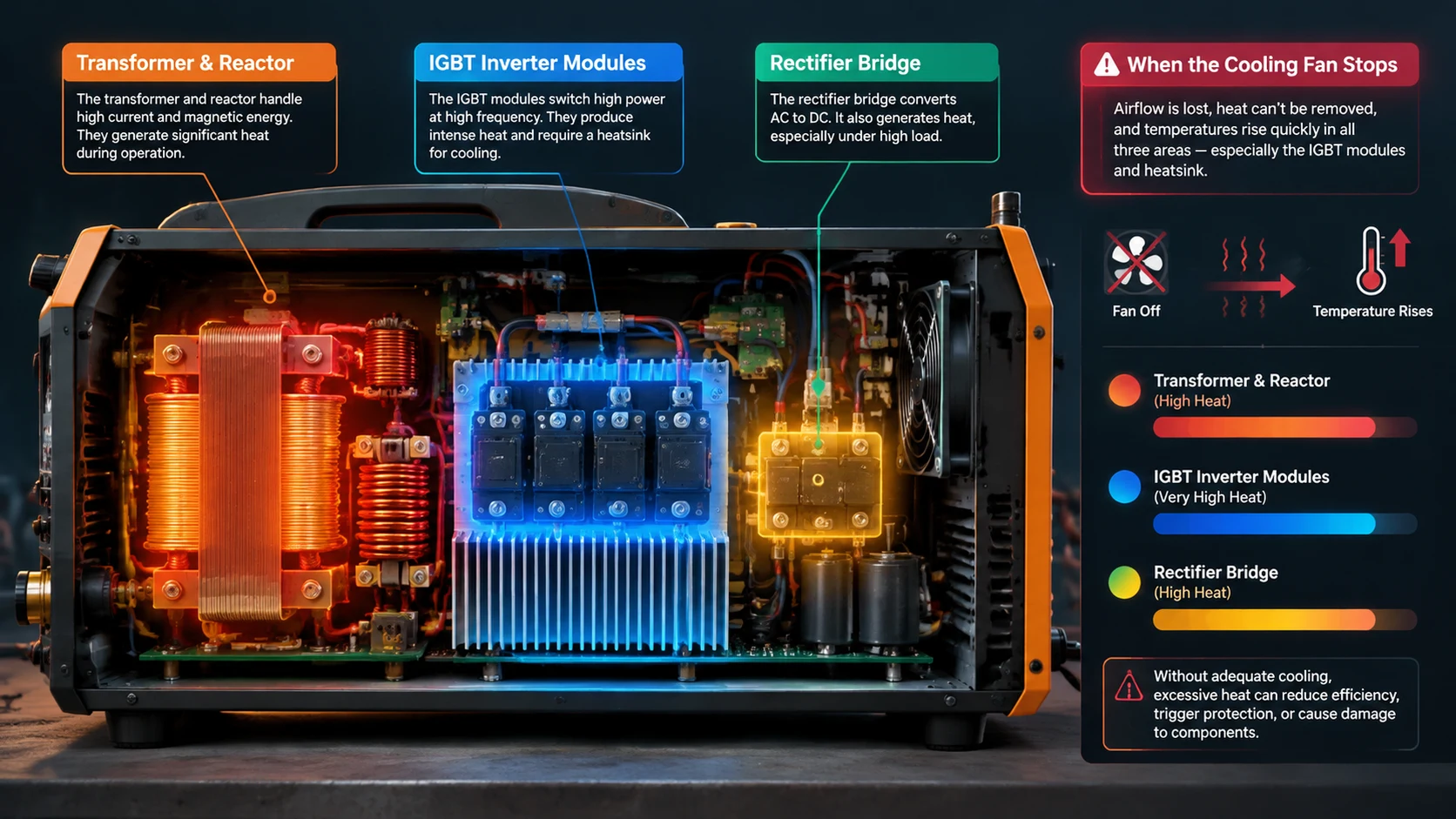
Which Parts of a Welding Machine Actually Get Hot?
Open the case and the temperature is not uniform. A transformer-based stick welder and a modern inverter welder put their heat in different places and fail for different reasons when airflow is lost. Working out the heat map first tells you which airflow pattern the fan has to serve.
Transformer and Reactor: The Continuous Heat Source
The main transformer and series reactor carry the full welding current, so their copper and core losses run for as long as the arc is struck. Their advantage is thermal mass: a large transformer heats and sheds slowly. Their weakness is that once the core is hot, only sustained airflow brings it back down.
IGBT Inverter Modules: Small Area, High Heat Flux
In an inverter welder the switching losses land on a very small silicon area, so the heat flux through the module and its heatsink is far higher than in a transformer of the same rating. The module has little thermal headroom, and its fins only work if air passes between them. This is the part that suffers first when a fan slows, and the one that turns a fan problem into an expensive repair.
Rectifier Bridge and Busbar Joints
Rectifier diodes generate conduction loss, and every bolted busbar or terminal joint adds a little resistance. A joint that has loosened slightly becomes a local hot spot: resistance rises, the joint runs hotter, and the heat travels into the neighbouring electronics. Airflow cannot fix a loose joint, but a fan that keeps the busbar area moving slows how fast the damage spreads.
Torch, Cables and Work Return: Heat Outside the Case
The torch, electrode cable and work-return lead carry the arc current and heat by the same resistance law. None of this is cooled by the internal fan, but it sets what the operator notices first. Undersized leads are a frequent cause of “the welder feels hot.”
Heat source
Loss type
How it is cooled
What fails if airflow stops
Main transformer / reactor
Copper and core loss
Bulk airflow across core and windings
Insulation ages faster; winding temperature climbs over hours
IGBT inverter modules
Switching loss
Directed airflow across heatsink fins
Rapid junction over-temperature and module failure
Rectifier bridge
Conduction loss
Airflow across the bridge and its heatsink
Diode degradation; thermal cut-out on long duty
Busbar and terminal joints
Contact resistance
Indirect — general case airflow
Local hot spot; discoloured, pitted terminals
Torch, electrode and work leads
Conductor resistance
Not fan-cooled
Hot grip and cable; voltage drop, unstable arc
Why Higher Welding Current Makes Forced Air Cooling Mandatory
At low current a welder can coast on natural convection. As current rises the arithmetic turns against it, and forced airflow stops being a refinement and becomes the only thing keeping the electronics alive.
Losses Rise Faster Than Current
Resistive loss follows the square of the current, so a machine at twice the current does not make twice the heat — it makes roughly four times as much in the windings and conductors, and switching losses rise with current and frequency as well. The hotter the duty, the more the machine depends on a fan actually moving air, because the heat load grows faster than the number on the ammeter.
Duty Cycle and Ambient: The Two Hidden Multipliers
Two rating-plate numbers decide how hard the fan must work. The first is duty cycle: a welder rated for a percentage of time at a given current is expected to rest in between, and running it continuously at that current asks for cooling it was not built to provide. The second is ambient temperature — a welder rated near a 40 °C reference loses usable margin on a hot floor. Confirm both against the manufacturer’s data before assuming a fan is good enough.
What Happens When the Air Stops
When airflow falls, a thin layer of hot air sits against the heatsink and windings and insulates them instead of carrying heat away. Component temperature climbs, thermal protection cuts the arc, and the operator sees repeated trips or a welder that suddenly feels weak. If the cut-out is bypassed or fails, the same condition ends in destroyed IGBT modules or a burnt winding. Inverter-based machines share this behaviour with other power-electronics loads, so the sizing logic in our guide to cooling fans for inverter motors applies here too.
Axial Fan or Exhaust Fan? Choosing the Air-Moving Principle
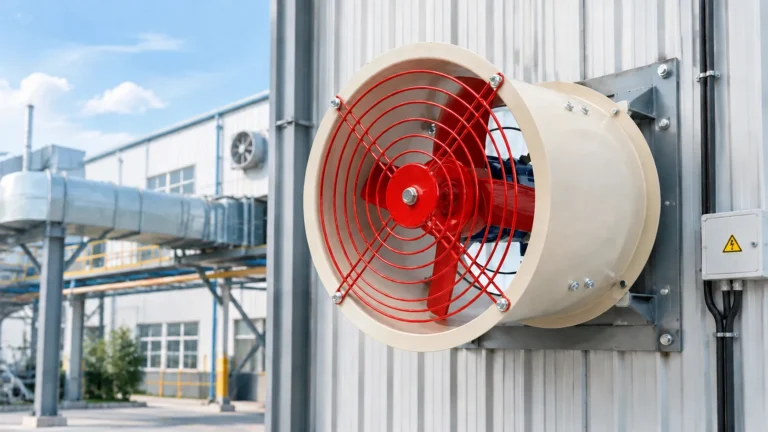
Choosing a cooling fan for welding machine cases starts with the air-moving principle, not the frame size. An axial fan for welding machine cabinets moves air along its own shaft and suits bulk airflow through a case. An exhaust fan for welding machine enclosures is the same impeller used to pull hot air off the outlet. What matters is not the name but where the fan sits and which way it pushes.
Axial Fans for Bulk Airflow Through the Case
An axial fan delivers high flow at low static pressure. That suits a welder with an open internal path — air drawn in one face, swept across the transformer and board, pushed out the other. Frames of 120 mm and 172 mm are common, usually mounted to blow air into the case. The working principle is well described in our explainer on how an axial fan works.
Exhaust Fans for Pulling Hot Air Off the Outlet
Mounted at the outlet and set to extract, the same impeller removes the hottest, top-most layer of air directly. That can be better when the transformer sits high in the case and the only practical cut is in the top or rear face. The cost is a slight negative pressure, so unfiltered air enters the remaining gaps — defensible in a clean shop, hard to defend next to a grinding bay.
Blowers and Centrifugal Fans for Directed, High-Pressure Flow
When heat is concentrated on the IGBT heatsink and space is tight, a blower or small centrifugal fan beats an axial fan. These units trade airflow for static pressure, letting them push air through fin passages that would stall an axial fan.
Reading the Air Path: Intake, Filter and Exhaust Placement
Flow rate is only half of cooling. The other half is whether air passes over the parts that need it or takes the shortest route straight from intake to exhaust.
Where the Intake Should Sit
Put the intake low and away from the weld spatter and grinding dust near the work zone. On a portable machine it often carries a grille or foam pad; on a fixed power source it may be a louvred panel with a replaceable filter. It should not face the operator’s weld position, where the air is dirtiest.
Why Exhaust Placement Decides Case Temperature
Heat collects at the top of the case, so the exhaust belongs high on a face opposite the intake, not directly above it. Two openings stacked on the same wall create a short channel that sweeps only the components in that corridor and leaves the rest in still air. Offsetting inlet and outlet forces the airstream to cross the transformer and boards diagonally, which is worth more than a slightly larger fan. The same principle governs enclosures elsewhere, and our industrial axial fan selection guide works through the trade-offs for large cabinets.
Keeping Metal Dust Out of the Electronics Bay
Metal dust is what separates a welding shop from a clean control room. Fine conductive particles bridge across PCB tracks and terminal blocks, drop the insulation resistance, and create the leakage paths that end in a flashover. Because the danger is conductive rather than merely abrasive, the answer is filtered airflow at positive pressure: clean air in through a filter, leakage going outward through the seams. A filter that is too fine starves the fan, so choose the finest medium the fan can overcome and check it long before it loads solid.
Sizing the Fan: Airflow Against Static Pressure, Not Free Air
The most common specification mistake when choosing a cooling fan for welding machine cases is comparing a replacement’s free-air airflow against the original’s and assuming the bigger number wins. It rarely does, because a fan in a welder never sees free air.
Why the Label Figure Is Only a Starting Point
A fan’s headline airflow is measured with no restriction in front of it. In a real welder it has to pull through a grille or filter and push into a case packed with fins, board, cables and a transformer. Every obstacle costs static pressure, and delivered airflow drops as resistance rises. A fan with a steep pressure-flow curve holds its flow against that resistance; a shallow curve loses most of it. Delivered airflow at the system’s real resistance decides cooling, not the figure on the box.
How Fins and Filter Media Add Pressure Drop
Dense heatsink fins and a loaded filter mat are the two biggest resistances in the path. Tighter fins cool better in theory but cost more pressure; a finer filter cleans better but starves the fan. As a filter loads, the resistance climbs steadily, so the airflow you measured at installation is not the airflow the machine will see in a month.
A First-Pass Airflow Estimate
For an initial estimate of the airflow a case needs, start from the dissipated power and the allowable temperature rise above ambient:
Treat any figure this produces as a starting point only. It assumes the air crosses the heat sources and ignores pressure losses, so the fan you fit must deliver that flow at the real system resistance, on the hottest day, at the shop’s altitude. Confirm the final choice against the fan maker’s pressure-flow data rather than a single formula.
The Replacement Checklist: What Has to Match
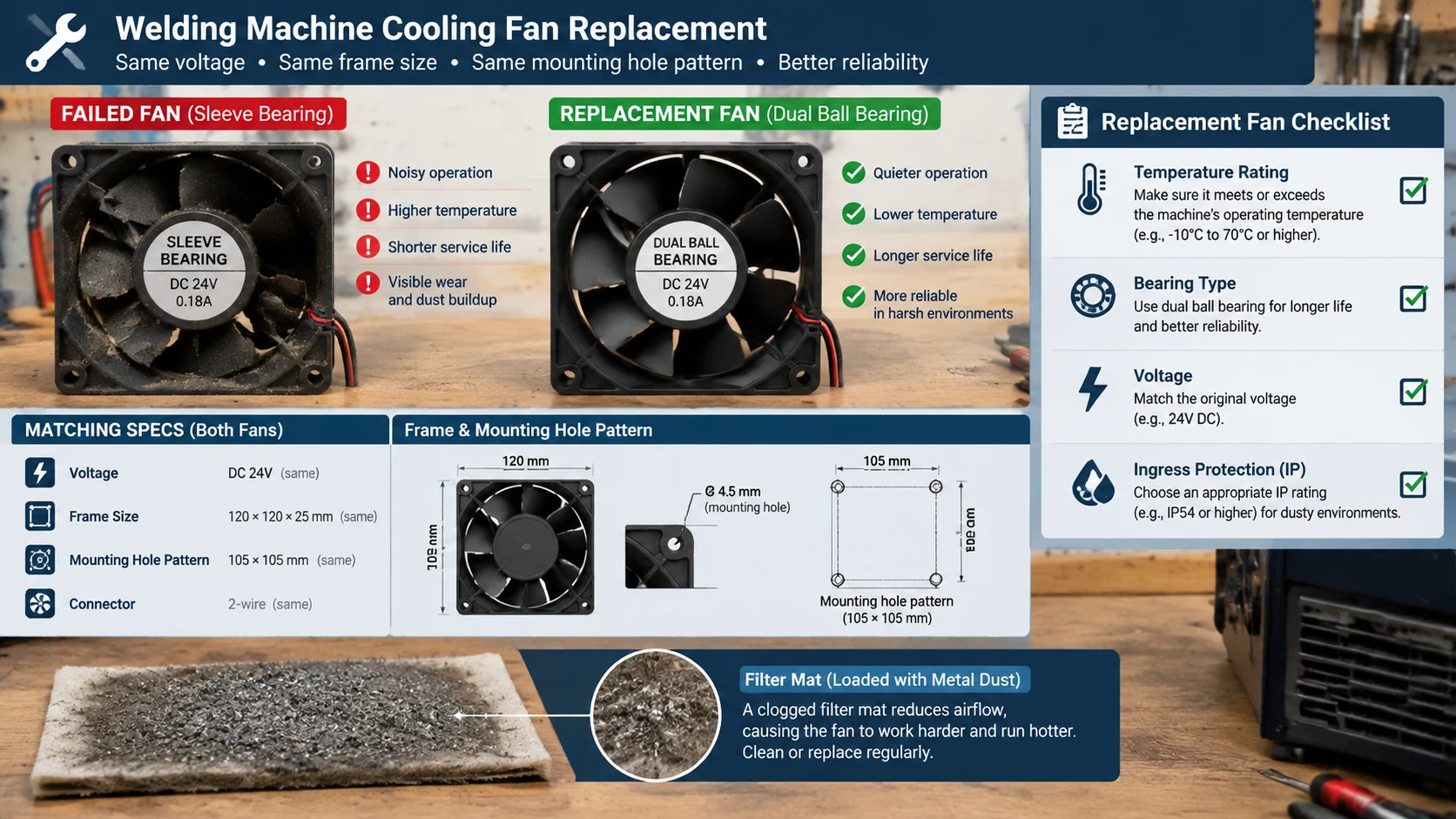
Replacing the cooling fan for welding machine units on the bench is a specification job, not a size job. Before ordering, lift the failed fan, read every value off its label, and match each against the replacement.
Temperature Rating and Bearing Type
The fan sits in a hot case and its own motor adds heat, so its temperature rating must exceed the case air temperature with margin. Bearing type drives life: ball bearings tolerate heat and vibration far better than sleeve bearings and suit a machine that runs hot and vibrates. A dual-ball-bearing fan is a common upgrade where the original sleeve unit failed early, the trade-off being slightly higher noise. For what actually ends a fan’s life, see our note on axial fan lifespan.
Voltage, Phase and Speed
Read the supply voltage exactly: 12 V DC, 24 V DC, 115 V AC, 230 V AC and 380 V AC are all found on welders. A 24 V DC fan fed from a 12 V rail runs slow and weak; a 115 V fan on 230 V does not last long. Match the phase on AC units and check the rated speed as well as the airflow — the two are linked, and a nominally identical fan at lower rated speed moves less air. Where the internal supply is below the fan’s rating, measure the actual terminal voltage with a meter rather than trusting the schematic.
Ingress Protection and Insulation Class
In a welding environment the fan faces metal dust, conductive particles and occasional moisture. An ingress-protection rating of IP54 or higher keeps the worst of it out of the bearing and winding; the exact rating depends on how dirty the shop is, so confirm it against the machine’s duty. Inside the motor, a higher insulation class buys margin against hot case air; take both ratings from the data sheet.
Connector, Rotation and Mounting Pattern
The new fan must bolt to the same hole pattern, spin the right way, and connect through the same terminal or plug. On DC fans polarity sets rotation; on AC fans the wiring order does. Match the footprint exactly — a fan slightly too large obstructs the airflow it is meant to serve, and one too small will not fill the opening.
Five Failures That Take a Welder Down
Most welding fan failures are not dramatic. They are slow losses of performance that turn into a thermal fault on a hot afternoon. These five cover the majority of what reaches a repair bench.
Bearing Seizure: The Fan That Turns Too Slowly
The most common failure. Grease ages, the bearing dries, friction rises, and the fan slows long before it stops. To the ear it still sounds like a working fan; to the hand, the shaft feels rough or tight when turned with the power off. A fan that needs a push to start, or stalls when the machine is tilted, is on its way out, and the cooling margin it was holding disappears before it does.
Dust-Loaded Blades and Imbalance Vibration
Dust and metal powder build up unevenly on the blades, so one side of the impeller is heavier than the other. The unbalanced fan vibrates, and the vibration loosens mounts, cracks solder joints and wears the bearing faster. A fan that has become noticeably noisier and buzzes at speed should be cleaned first; if the imbalance returns quickly or the blades are deformed, replace it rather than balancing by hand.
Blocked Filter and Repeated Overheat Trips
A loaded filter raises the resistance the fan works against until delivered airflow falls below what the case needs. The machine then trips its thermal cut-out under load, cools, resets, and trips again — the classic “works in the morning, trips in the afternoon” pattern as ambient temperature rises. The fan is often blamed and replaced when the real fault is the filter mat. Clean or renew the filter first, then re-check whether the fan still delivers.
Loose Terminals and Voltage That Sags
A fan supply terminal worked loose by vibration raises contact resistance, and the fan sees a lower voltage and turns slower. The same effect comes from a degraded connector or a corroded wire end. When a fan spins weakly but its bearing feels smooth, measure the voltage at the fan terminals with the machine running; if it is below the fan’s rating, the fault is upstream in the wiring, not the fan.
Metal Dust and Falling Insulation Resistance
Conductive dust that has worked past the grille bridges across windings, terminals and board tracks. It usually does not stop the fan; it lowers the insulation resistance until leakage current rises, and eventually it can flash over. The tell-tale is a fine grey film on the fan and the surrounding board. This is why an insulation check belongs in any fan replacement in a dirty shop — a new fan in a contaminated case inherits the same problem.
AC or DC, Ball or Sleeve: A Selection Table
The choice usually narrows to a few combinations once the machine’s internal supply and environment are known. The table below is a starting frame; confirm every value against the machine and the datasheet.
When an AC Mains Fan Is the Right Fit
Mains-powered welders with a transformer and a simple internal supply usually carry an AC fan, and an AC axial fan fits bulk case ventilation well. It has no separate supply to fail, runs directly off the machine’s mains, and is easy to service.
When a DC or EC Fan Earns Its Place
Inverter welders commonly derive a 12 V or 24 V DC rail for their control electronics, and a DC fan runs directly from it. DC and electronically commutated fans are more efficient, can be speed-controlled against temperature, and come in compact depths. Compact inverter designs often pair a DC fan with a low-noise impeller where the case is small. Where cooling demand varies, a speed-controlled fan saves bearing wear by running slower when the load allows.
Option
Typical supply
Strength
Best used for
AC axial fan
115 / 230 / 380 V AC
No separate supply to fail; simple and rugged
Transformer-based welders; bulk case airflow
DC axial fan
12 / 24 / 48 V DC
Compact, efficient, runs from the control rail
Inverter welders; space-limited cases
EC / speed-controlled fan
As above with control input
Adjusts to thermal load; less bearing wear
Machines with variable duty and noise limits
Blower or centrifugal fan
AC or DC per machine
High static pressure; directed flow
Tight fin stacks and ducted internal paths
Sleeve-bearing fan
Any
Lower cost, quieter when new
Cool, clean duty only
Ball-bearing fan
Any
Tolerates heat and vibration; longer life
Hot, dusty, high-duty welding machines
Replacing the Fan: A Step-by-Step Workshop Procedure
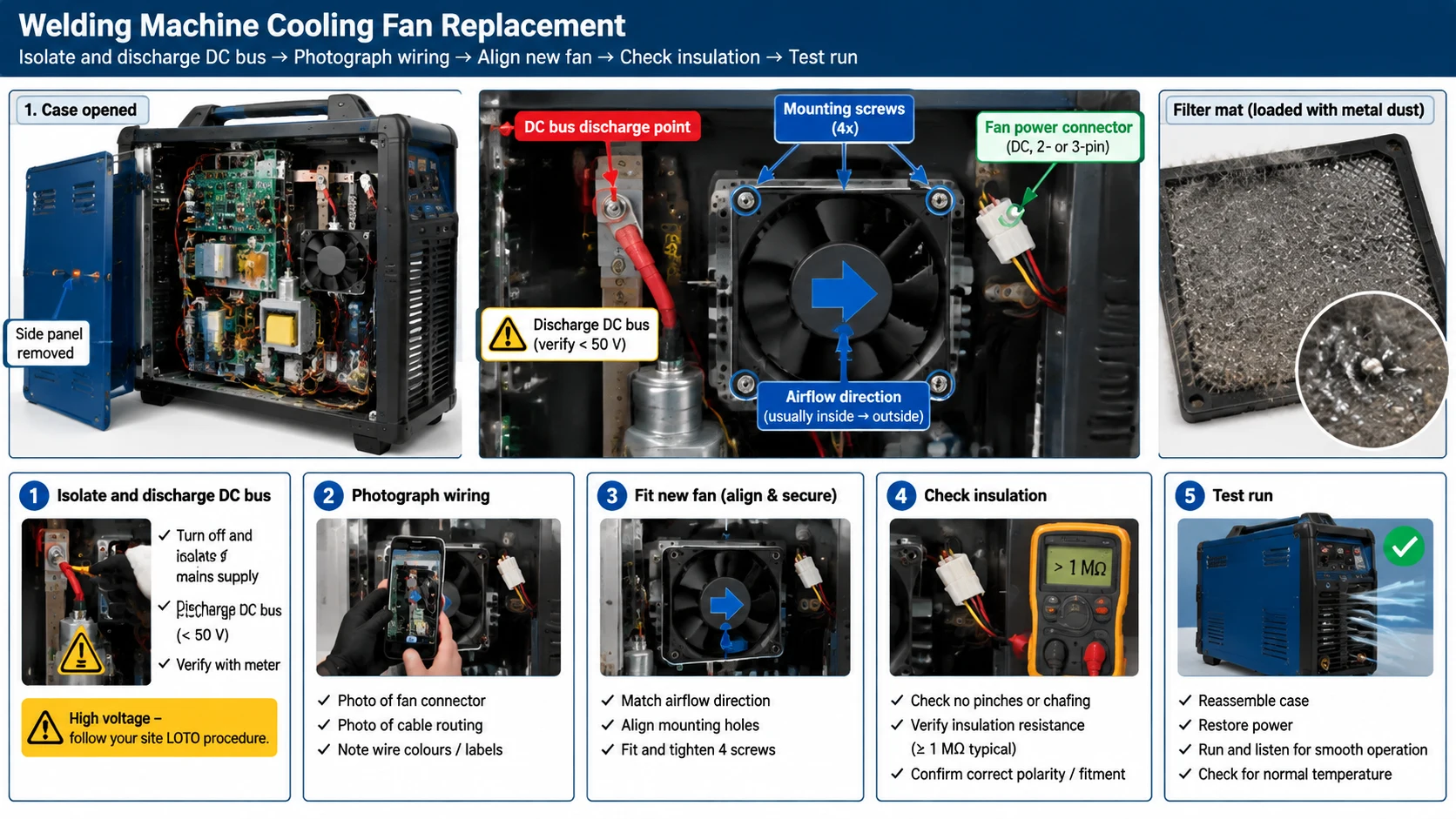
With the right fan in hand, the swap is a short job if it is done in the right order. The sequence below assumes a machine that has been running.
Step 1 — Isolate and Discharge the DC Bus
Switch the machine off, unplug it, and lock out the supply if the welder runs on a dedicated circuit. In inverter machines the internal DC bus capacitors hold a dangerous charge after the mains is removed, so wait long enough for them to bleed down — a few minutes is typical for a small machine, but confirm the safe wait time from the manufacturer and, where possible, verify the bus voltage with a meter before touching anything.
Step 2 — Photograph the Wiring and Pull the Old Fan
Before disconnecting anything, photograph the terminal block and the wire routing. Disconnect the fan supply, remove the retaining screws or clips, and lift the fan out, noting which face was the intake. Keep the screws and any gasket or grille with the new fan so reassembly matches the original.
Step 3 — Fit, Align and Torque the New Fan
Clean the mounting face and surrounding case before fitting, because dust left behind is drawn straight into the new fan. Seat it so the airflow direction matches the original, align it squarely so the blades do not rub, and tighten the mounting screws evenly so the frame is not distorted.
Step 4 — Insulation-Check Before You Power Up
In a shop with conductive dust, check the insulation resistance of the fan circuit before energising it. Meter from the fan terminals to the case and confirm a healthy reading against the manufacturer’s minimum; a low reading means metallic dust is bridging somewhere in the circuit and will leak or flash over once power is applied. Clean the area until the reading is acceptable.
Step 5 — Test Run and Measure Current and Temperature Rise
Power the machine with the case open and confirm the fan spins at full speed, turns the correct way, and moves air with no unusual noise or vibration. Then close the case, run it under load, and measure the fan’s input current against its rating and the case temperature rise. A fan drawing well above its rated current is working against too much restriction or is the wrong fan; one drawing far less may be starved or faulty. The industrial cooling fan range covers the common frame sizes for this duty, and a dual-ball-bearing version is worth specifying where the original died young.
Field Diagnosis: Matching the Symptom to the Cause
On the bench, the fastest route to the fault is to work backwards from the symptom — the table below arranges the five failures above the way a call-out unfolds.
No Spin and No Noise
If the fan is silent when the machine is powered, check the supply to the fan first: a blown fan-circuit fuse, an open thermal switch, or a loose terminal all show as a dead fan. Only when the supply is present and correct is the fan itself the suspect. Short across a thermal switch only long enough to test, and replace it rather than leaving it bridged.
Spins But Moves Weak Air
A fan that turns but barely moves air is usually a failing bearing, a contaminated impeller, or a supply voltage below the fan’s rating. Turn the blades by hand with the power off — free and smooth points to the supply or the impeller, rough or tight points to the bearing.
Trips Only in the Afternoon
A welder that welds all morning and trips on thermal protection in the afternoon is the signature of cooling that works but with too little margin. Ambient temperature has risen and the heat load has not changed, so a partly blocked filter, a slow fan or a dusted heatsink shows up now and not earlier. Check filter, fan speed and heatsink fins in that order before assuming an electrical fault.
Symptom
Likely cause
First check
Action
Fan dead, no sound
Fuse, thermal switch or supply
Voltage at fan terminals
Restore supply before touching the fan
Fan turns slowly, rough shaft
Bearing seizure
Turn blades by hand, power off
Replace the fan
Loud buzz or vibration
Imbalance from dust or damage
Inspect blade surfaces
Clean; replace if it returns or blades are bent
Repeated overheat trips
Blocked filter or dusted heatsink
Filter mat and fin passages
Clean or renew; re-check delivered airflow
Weak airflow, smooth bearing
Low fan voltage
Fan terminal voltage under load
Remake the terminal or replace wiring
Grey film, occasional trip
Conductive metal dust
Insulation resistance to case
Clean the case; remedy filtration
Frequently Asked Questions
Can I replace a welding machine cooling fan with any same-size fan?
No. Size is only one of five values that have to match. The replacement must also match the voltage and phase, the rated speed and airflow, the bearing type and temperature rating, and the mounting and connector. A same-size fan at the wrong voltage runs slow, and one with a sleeve bearing in a hot case fails early. Read every value off the original label before ordering.
Why does my welder’s fan spin slowly or stall?
Usually a failing bearing, which drags on the shaft and slows the fan before it stops completely. The next most common cause is low supply voltage from a loose or corroded terminal, which makes the fan weak even though the bearing is fine. Turn the blades by hand with the power off: rough or tight means the bearing, free and smooth means measure the voltage at the fan terminals.
Does the fan need a filter in a metal-working shop?
Yes, if the machine draws shop air through the case. Metal dust is conductive, so the risk is not only wear but leakage paths across boards and terminals that lower insulation resistance and can flash over. Fit the finest filter the fan can overcome, run the case at slight positive pressure so leakage goes outward, and inspect the filter long before it loads solid.
Should the fan blow into the case or pull air out?
For a case with a clear internal path, blow filtered air in and let it leave through a high opening on the opposite or adjacent face — that keeps the case at positive pressure and the incoming air clean. Pull air out when the hottest parts sit high and a top or rear cut is the only practical option, accepting a slight negative pressure.
How often should a welding machine cooling fan be replaced?
No fixed interval suits every machine, because life depends on bearing type, case temperature, duty cycle and dust. In a hot, dirty, high-duty shop a fan may last far less than in a clean, light-duty one. Inspect at every service — hand-turn the blades, check dust loading, listen for bearing noise — and replace at the first sign of roughness or slow spin rather than waiting for a thermal fault.
What to Confirm Before You Order a Replacement
Start from the heat map, not the fan label. Know which parts carry the heat — transformer, IGBT heatsink, rectifier — and which airflow pattern reaches them. Remember that losses rise faster than current, so a dirty fan that was adequate at low duty will not be at high duty on a hot afternoon. Match the replacement on every value that matters: temperature rating and bearing type, voltage, phase and speed, ingress protection and insulation class, and the mounting and connector pattern. Then follow the swap through to a test run that measures current and temperature rise, because a fan that spins is not proof that cooling has been restored.
If you are specifying a cooling fan for welding machine builds or a fleet of service replacements, our range of high-speed cooling fans and dual-ball-bearing fans is built for hot, dusty enclosures.
A symptom-first guide to an exhaust fan not working: five failure patterns, power, control and capacitor checks, bearing faults, air-path blockages, and how to match a replacement fan.
Industrial exhaust fan noise has three distinct families - aerodynamic, mechanical and electromagnetic - and each needs a different fix. This guide gives a five-step field diagnosis, then covers source-first remedies: speed reduction, balancing, bearings, vibration isolation, silencers and placement, with the airflow trade-offs made explicit.
An EC plug fan pairs a brushless external-rotor motor with a backward-curved impeller and no scroll housing. This guide covers AHU selection, control signals and retrofit steps.