Exhaust Fan Not Working? Bearing, Motor and Wiring Troubleshooting
Published: Author: Rachel
A stopped fan is rarely a mystery once you stop guessing. When an exhaust fan not working complaint reaches the maintenance desk, the useful question is not “what is broken” but “which of five patterns does this match” — because each pattern points at a small, ordered set of likely faults. This guide is written for the people who get the call: factory maintenance staff, electricians and the purchasers who support them. It works from the symptom inward — power, control circuit, capacitor, bearings, impeller and air path — and it separates what you can check in five minutes without opening anything from what must only be done with the supply locked off.
Two rules frame everything below. First, never accept a single cause: an overheated motor is often the symptom of a bearing or capacitor fault upstream, and fixing the motor without fixing the cause guarantees a repeat. Second, treat every terminal as live until you have proved it dead. Isolate, lock out and tag out, prove dead with a tested instrument, and remember that a capacitor can hold a dangerous charge long after its supply is removed.
Sort by Symptom First: Five Failure Patterns
Before you touch a tool, name the symptom in your own words and match it to one of the five patterns below. Almost every exhaust fan not working call — and nearly every “why exhaust fan not working” question — resolves into one of these five. The pattern decides both the sequence of checks and who is allowed to open the machine, because most wrong repairs start with a technician solving a fault other than the one in front of them.
Pattern 1 — The Fan Will Not Turn at All
A fan that sits silent, or hums without moving, is usually a supply or start-circuit fault rather than a dead motor. Work the power and control circuit first, then the capacitor on a single-phase unit, then the bearings. A hum with no rotation is the classic signature of a motor that has voltage but cannot produce starting torque — on a single-phase fan that means the capacitor or a seized bearing, and on a three-phase fan it usually means a missing phase or a contactor fault.
Pattern 2 — It Turns but Moves Far Too Little Air
The motor runs, the shaft spins, and the room still will not clear. This pattern lives on the air side: a dust-loaded or damaged impeller, a blocked or collapsed duct, a stuck backdraft damper, or a discharge opening that has been covered, screened or built over. Check that the fan is turning the right way, because a fan running backwards still moves some air and is easily missed.
Pattern 3 — Noise or Vibration While Running
Noise is a symptom here, not the subject — this article is about a fan that has stopped performing. The useful distinction is between a rough, gritty, load-linked character (mechanical: bearings, imbalance, loose fasteners) and a steady hum that barely changes with speed (electromagnetic). A sudden change in noise usually means something mechanical changed: a deposit on a blade, a loosened fastener, or a bearing failing.
Pattern 4 — It Trips the Breaker or Cuts Out Hot
Repeated breaker trips or a motor protector cutting out under load are diagnostic data, not inconvenience. A fan working against seized bearings, a failing capacitor or degraded windings draws excess current, and the protective device is doing its job. Do not reset it repeatedly as a habit: find the reason for the current rise before the next start, because a locked rotor is a real fire path.
Pattern 5 — It Starts and Stops Intermittently
Intermittent operation points at a poor connection, a failing control device, a marginal thermal protector, or a supply that sags. Loose terminals, worn contacts, corroded joints and undersized wiring all behave this way, and they heat as they pass current. Intermittent faults are the ones most likely to be left too long, so close out a repeated start-stop pattern rather than noting it and moving on.
Loose terminal → switch/contactor → thermal protector → supply sag
Inspect and tighten terminations
Electrician
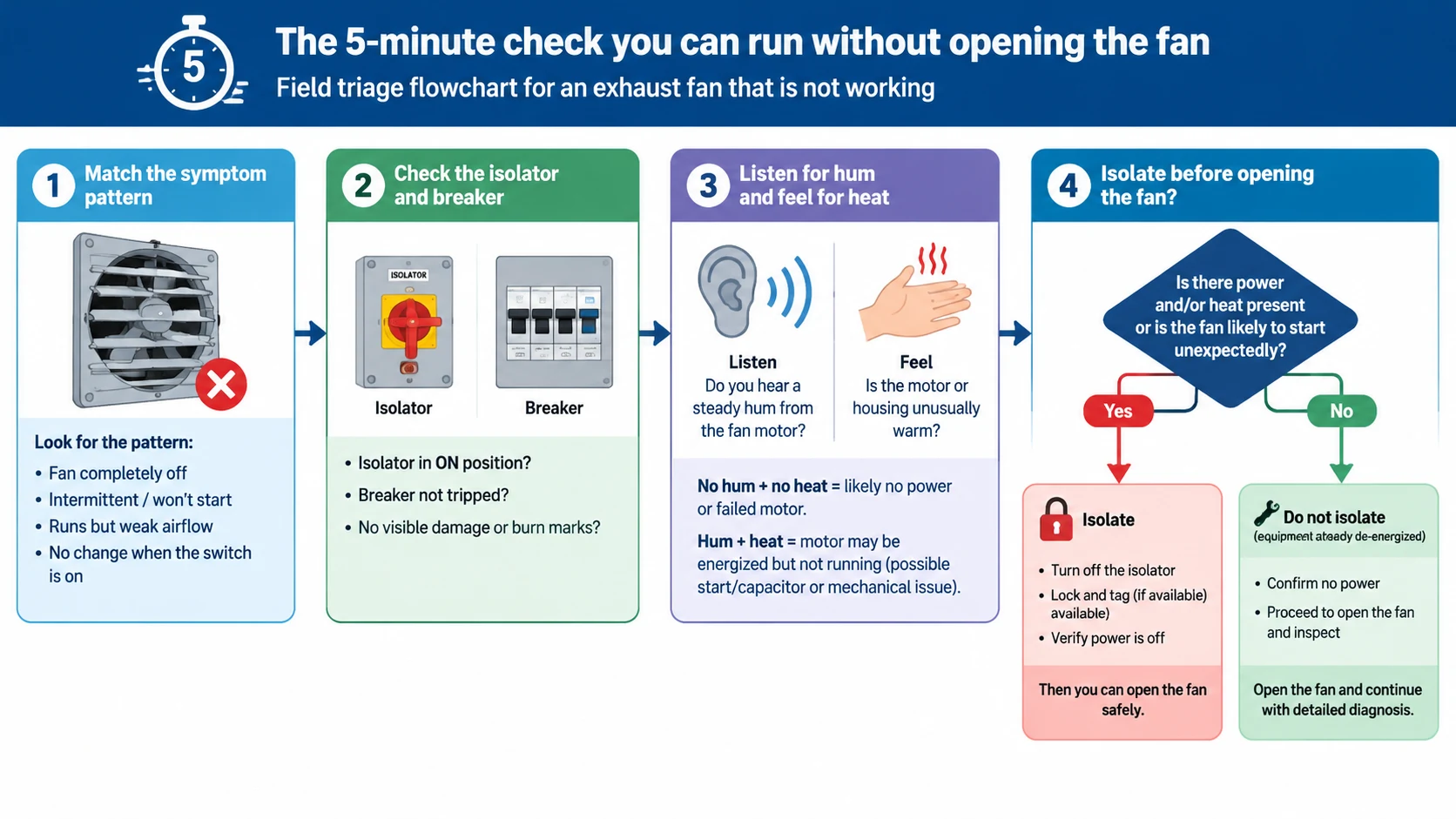
The 5-Minute Check You Can Run Without Opening the Fan
Before any cover comes off, four quick steps will tell you whether this is a trivial fix, a job for the electrician, or a fault that needs the machine opened. None of them requires you to break a seal or disturb the impeller, so you lose nothing by starting here.
Step 1 — Confirm the Symptom and the Duty
Write down what the fan does or does not do. Is it a fresh failure, or has performance fallen away over weeks? A fan that never turned is an electrical question; a fan that slowly lost suction is an air-path question. Note the duty as well — how much lost airflow matters depends on what the fan protects.
Step 2 — Look at the Isolator, Indicator and Breaker
Confirm the local isolator is closed, that any indicator or control panel says the fan should be running, and that the protective device has not tripped. If a breaker or protector has tripped, do not simply reset it and walk away: note whether it trips immediately on start or only after running a while, because that observation separates an electrical fault from a thermal or mechanical one, as the table above shows.
Step 3 — Listen and Feel: Hum, Heat and Airflow
With the fan commanded on, listen at the housing. A clean hum with no rotation is the start-torque signature; a buzzing or chattering suggests a contactor or a loose connection. Feel the motor body where it is safe to touch — abnormal heat means it is working against something. At the discharge, a hand held near the opening shows whether the fan moves any air, and in which direction.
Step 4 — Decide Whether It Is Safe to Keep Digging
This is where many people should stop and call the electrician instead of continuing. Isolate if you see or smell burning, if there is smoke or scorching at the terminals, if the fan keeps tripping a protector, or if you cannot take the measurement you need from a safe position. Everything past this step assumes a qualified person on a proved-dead circuit, with the impeller stopped and secured.
Power and Voltage: Where Most “Dead” Fans Actually Fail
A fan that will not start is more often starved of correct voltage than dead, and a supply fault is the most common reason an exhaust fan not working complaint turns out to be electrical rather than mechanical. Loose terminations, a dropped phase, a supply that sags under load and undersized cable all interrupt or weaken the supply without any component having failed outright, so work the supply before you condemn the motor.
Single-Phase Supply Checks
Confirm the correct voltage is present at the fan’s own terminals, not merely at the panel, because the fault often lies in the run between them. Check the neutral and earth paths as well as the live conductor — a floating neutral can leave a fan with a plausible-looking voltage and no working circuit. If the fan hums on a single-phase supply, measure the run current and compare it with the nameplate figure; a current well above rated with no rotation points to a start-circuit fault or mechanical seizure rather than a supply problem.
Three-Phase Supply and Missing Phase
On a three-phase fan, the single most common cause of failure to start is a missing phase — one blown fuse or one open contactor pole leaving the motor single-phased. A three-phase motor with a phase lost will hum, draw heavy current in the remaining phases and produce no useful torque, and it will overheat quickly if left energised. Measure all three line voltages to neutral and phase-to-phase at the motor terminals, and confirm the sequence on a new installation, because a mis-sequenced supply runs the fan backwards — which is Pattern 2, not Pattern 1. Confirm the correct sequence for your fan with the manufacturer before first start-up.
Loose, Overheated or Undersized Wiring
Look at every termination for discoloured insulation, heat-shrink that has shrunk further, a smell of hot plastic or a screw that has bitten into a loose strand. Vibration loosens terminals, and a high-resistance joint both drops voltage and runs hot. Confirm the cable is sized for the motor’s full-load current over its actual run length; a long, undersized feed that works at light load can sag badly at start, producing the intermittent behaviour of Pattern 5. For high ambient heat or long cable runs, verify sizing against the manufacturer’s data rather than a rule of thumb.
The Control Circuit: Switch, Contactor, Overload and VFD
With the supply confirmed, follow the command path that tells the fan to run. The fan itself is often fine; it is the switch, the contactor, the overload relay or the drive that has stopped passing the command through.
Switch and Contactor Contacts
A local switch or a contactor can fail open, fail closed or fail to make good contact. A worn toggle switch may move mechanically while passing no current; a contactor may pull in audibly while one set of contacts is burned and carries nothing. Check for voltage on both sides of the device with it commanded on — voltage present on the supply side and absent on the load side is the signature of an open contact. Inspect contact faces for pitting; chattering or buzzing contacts usually mean a failing coil or a control voltage that is itself sagging.
Thermal Overload Relays and Motor Protectors
An overload relay or a motor’s internal thermal protector cuts the circuit when current or temperature exceeds its setting, and resets after cooling. If the protector trips only after the fan has run a while, the cause is thermal: bearing drag, a fan working against extra resistance, restricted cooling around the motor, or a setting simply too low. A protector that trips instantly on start, by contrast, points at a supply or winding fault. Always find out why a protector operated: resetting without a cause is how a recoverable fault becomes a burnt motor.
Variable-Frequency Drive Faults
Where the fan runs from a variable-frequency drive, its diagnostics are the fastest route to the fault. Read the recorded fault code and trip history rather than clearing and restarting blindly: over-current, over-voltage, earth fault and over-temperature codes each point in a different direction, and many drives log the conditions at trip — at start, at a certain speed, or after a thermal soak. On motors driven by an inverter, the cooling arrangement must also suit inverter duty; fans for that job are covered in our guide to inverter motor cooling fan selection.
Capacitors: The Most Overlooked Single-Phase Fault
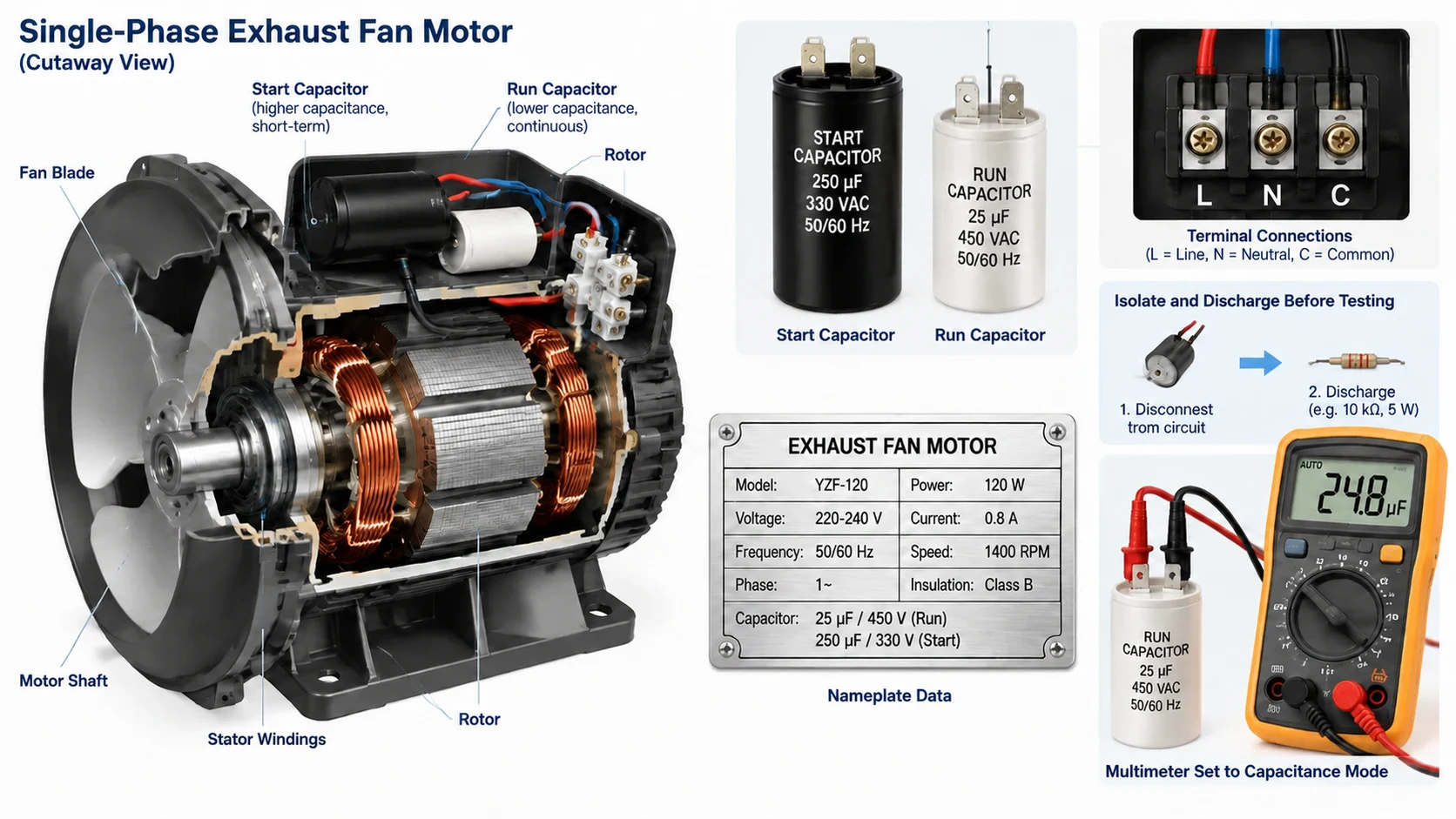
On a single-phase exhaust fan, a failed capacitor is one of the most common reasons the fan will not start, and it is one of the most frequently missed because the motor looks and sounds alive. A capacitor gives the split-phase motor its starting torque; when it fails, the motor hums, draws locked-rotor current and produces no rotation.
Start Capacitors and Run Capacitors
Capacitor-start motors use a larger start capacitor, energised only during start-up, and often a smaller run capacitor that stays in circuit to smooth running torque. Either can fail, and they fail in characteristically different ways: a start capacitor that opens leaves the fan unable to start at all, while a degraded run capacitor lets the fan start but run weak, hot and slow, which can appear as Pattern 2 or Pattern 4 rather than Pattern 1. Note which capacitors your motor has from its nameplate or wiring diagram, and confirm the type with the manufacturer — the values differ between motor designs and must not be guessed.
Testing a Capacitor With a Multimeter
Isolate and discharge the capacitor before testing — through a proper discharge resistor or tool, never a bare screwdriver. A capacitance meter gives the cleanest verdict: compare the reading with the value marked on the can, allowing a typical tolerance that the manufacturer states, and treat a reading far below the marked value as failed. A multimeter on the resistance range can hint at a short, but it cannot measure capacitance. Because the value and tolerance are motor-specific, confirm the test method and limits with the fan manufacturer rather than applying a generic figure.
Signs the Capacitor Is the Culprit
The strongest field evidence is behavioural: a single-phase fan that hums without turning, or that starts only when you nudge the impeller while it is safely isolated from drive, is showing a start-circuit fault. Physical clues are a bulged or split can, leaking electrolyte or a scorched terminal area, but a capacitor can also fail with no outward sign. Replace it with the exact type and value the manufacturer specifies; never substitute a value on the assumption that close will do.
Bearings: Seized, Noisy or Worn
Bearings are the part most likely to take an exhaust fan out of service, and a seized one is a leading reason you find an exhaust fan not working at all. They are also the common thread through Patterns 1, 3 and 4: they carry the shaft, hold the rotor in alignment and set how smoothly and quietly the fan runs. Age alone is rarely the whole story — dust, heat, moisture and grease loss do the damage.
Sleeve Bearings vs Ball Bearings
Small exhaust fans often use sleeve or oil-retaining bearings, while heavier and continuous-duty units generally use ball bearings. Sleeve bearings run quietly and cheaply but are sensitive to dry running and shaft position, and tolerate little thrust. Ball bearings carry radial and axial load, tolerate more speed and heat, and hold alignment, at the cost of a little more noise. In dusty or greasy duty the sealing arrangement matters as much as the type: the right choice is a decision to make with the manufacturer, and the difference in service life is usually significant. It is why a fan specified for continuous industrial duty is often built with a dual ball-bearing construction, as in our range of dual ball bearing AC fans.
Attribute
Sleeve / oil-retaining bearing
Ball bearing
Load carried
Radial, limited thrust
Radial and axial
Typical noise
Quieter when new and wet-lubricated
Slightly higher, steady
Dust / heat tolerance
Low — dries and seizes
Higher when correctly sealed
Service life (typical)
Shorter; sensitive to duty point
Longer in continuous duty
Typical application
Light, intermittent, quiet duty
Continuous industrial exhaust
Field serviceability
Often replaced with the unit
Replaceable to a matched spec
Recognising a Seized, Dry or Worn Bearing
With the fan isolated and the impeller stopped, turn it slowly by hand and feel for the truth the motor was hiding. A healthy bearing turns freely and smoothly; a dry or worn one feels gritty, notchy or stiff, and may catch at a point in the rotation. Lift the shaft gently for excessive axial end-float and rock it to check for play. A failing bearing often leaves a fine grey dust at the housing and sounds rough at any speed, not only at one. On a running fan, use a stethoscope against the housing to localise the noise to the bearing rather than the airstream.
When to Replace the Bearing and When to Replace the Unit
An exhaust fan bearing replacement is worth doing when the motor is otherwise sound: it draws correct current, shows no winding discolouration or burning smell, and reaches normal speed once the bearing is freed. On many small fans the bearing is not economically replaceable on its own, and a motor or unit exchange is the honest answer — especially if the shaft is scored or the housing is worn. Where a repair is viable, the new bearing must match bore, outer diameter, clearance and load rating, and be pressed on through the inner ring only, never hammered through the balls. Confirm the spec and fit with the manufacturer or a qualified motor shop; an off-spec bearing that fits will fail early. When failure is frequent, the guidance in our article on axial fan lifespan and MTBF helps separate a repairable wear item from a unit at the end of its life.
When It Runs but Airflow Plummets: Impeller and Air Path
Pattern 2 — a fan that runs but does not clear the space — is almost always on the air side. The motor is doing its job; the air is not reaching the fan, not passing the impeller cleanly, or not leaving the discharge. Work from the impeller outward, because how the blades move the air is the root of the fan’s performance.
Dust Build-Up and Impeller Imbalance
In dusty or greasy duty, deposits accumulate unevenly on the blades and change both the aerodynamics and the balance. The immediate effect is lost airflow; the secondary effect is vibration that loads the bearings and loosens fasteners. In heavy-dust applications, cleaning and rebalancing the impeller is often the single highest-value maintenance action available, restoring flow that looked lost to a failing motor. Clean to bare metal, check the blades for damage, and rebalance before running at speed.
Deformed, Cracked or Rubbing Blades
A blade bent by impact, cracked at the root or eroded by an abrasive airstream reduces airflow and adds imbalance at the same time. Look for a bright wear mark on the blade tip or a matching mark on the housing, which shows the impeller is rubbing — often because the shaft has shifted or a mounting bolt has loosened. Restore tip clearance to the manufacturer’s figure rather than to “as close as it will go”, and replace any cracked blade rather than straightening it. Why blade condition matters is set out in our article on how an axial fan works.
Duct Blockage, Collapse and Stuck Dampers
Downstream of the fan, a blocked or collapsed duct, a build-up of lint or grease, or a failed flexible connection strangles the airflow while the motor runs happily, even cooling itself with the air it cannot move. Check flexible connectors for collapse or separation, and confirm the duct run is intact from fan to discharge. A backdraft or gravity damper stuck shut — jammed by paint, corrosion, debris or, in cold conditions, ice — is a frequent and easily missed cause of “the fan runs but nothing happens”. Operate the damper by hand where safe to reach, and confirm it opens fully under airflow.
Blocked Intake or Discharge Openings
Finally, confirm the openings themselves are clear. Intake and discharge louvres blocked by stored materials, packaging, vegetation or new construction defeat a healthy fan, and the fault appears only when someone looks at the opening rather than the fan. Where an exhaust discharges into a space that has since been enclosed, or the intake now faces a wall added later, the fan is fighting a system that no longer exists as designed. Correcting the arrangement is often free and restores performance at once.
What Must Be Done With the Power Off
Everything past this point is a powered-down job. A fan that will not work is not worth a shock, so the discipline of isolation comes before any further measurement. If you are not qualified to work on the supply, your correct action is to isolate and call the electrician.
Lockout, Tagout and Stored-Energy Discharge
Isolate the fan at its isolator, lock it off and tag it with your name and the time, and prove the circuit dead with an instrument tested on a known live source before and after. Then deal with stored energy: capacitors hold charge, and a motor that has run may be hot. Discharge capacitors through a proper resistor or tool and let them settle before touching terminals. Never rely on a switch position or another person’s word as proof of isolation.
Continuity and Insulation Checks
With the fan dead and isolated, a multimeter’s continuity range shows whether a winding or control conductor is open, and an insulation tester reveals leakage to earth that a multimeter cannot see. Confirm the winding pattern the manufacturer specifies: an open winding, a winding shorted to earth or a phase imbalance each points to the motor rather than the supply. Compare readings with the manufacturer’s data, not a remembered figure.
Turning the Impeller by Hand
With the supply locked off, spin the impeller by hand. It should turn freely, without scraping the housing and without catching at a point in its rotation. Feel for axial float and radial play in the shaft, listen for grittiness in the bearings, and check the impeller is secure and every guard and mounting bolt tight. Done safely, this single check separates a mechanical fault from an electrical one more reliably than any reading taken from a distance.
Repair or Replace? Reading the Symptoms
Once the fault is located, the next decision is whether to repair, replace a sub-assembly, or replace the unit. The right answer depends less on the age of the fan than on what has failed and what a repair would leave behind.
When a Repair Still Pays
An exhaust fan repair is usually the best value when the failure is a discrete, replaceable part and the rest of the fan is sound: a failed capacitor, a worn contact, a burnt control device, a stuck damper, or a bearing on an otherwise healthy motor. These are modest, predictable jobs that return the fan to rated performance, and they are worth doing promptly, because a fan left running in a degraded state damages the parts that were still good.
When Replacement Is the Honest Answer
Replacement becomes the better decision when the fault has spread: windings that show heat damage or a burning smell, a scored shaft, repeated bearing failures in a fan that is otherwise worn, a housing that is corroded or cracked, or a repair cost approaching a large fraction of a new unit of equivalent specification. A fan that is fundamentally undersized for its duty, and has spent its life running hard and hot as a result, is also a replacement case rather than a repair one, because fixing it will not fix the underlying mis-selection.
The Signals an Engineer Tracks Over Time
Most fans announce their decline before they fail. Rising current draw, a bearing that needs greasing more often, a slow drift in airflow, gradually increasing vibration and a noise character that changes without speed changing are all leading indicators. Tracking them turns a sudden breakdown into a planned replacement — the difference between a fan that fails overnight and one changed out during a scheduled stop.
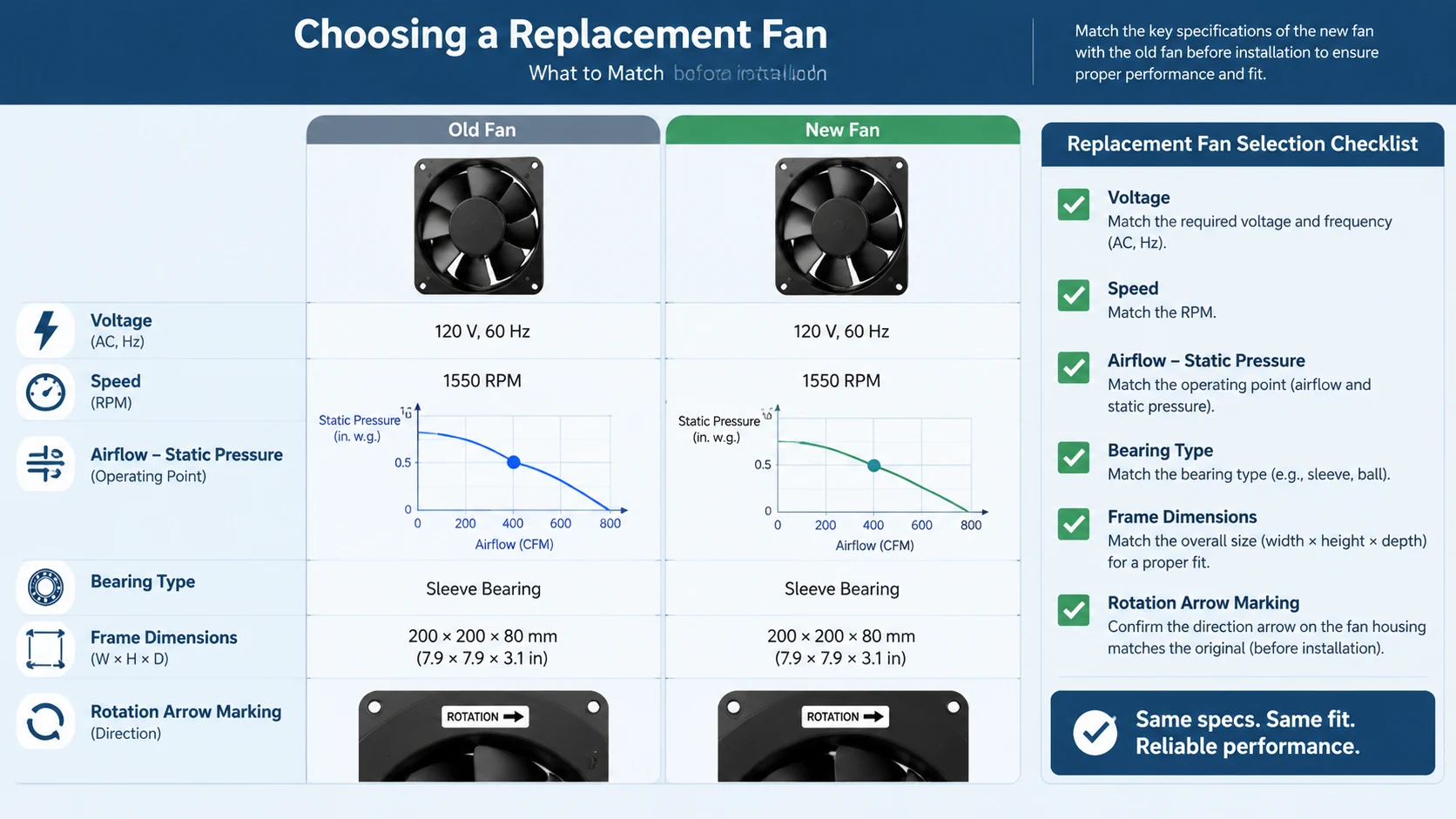
Choosing a Replacement Fan: What to Match
If the fan is to be replaced, the replacement must match the installation electrically, aerodynamically and mechanically. Getting any one of these wrong produces a fan that either will not fit, will not start, or will run but fail to do the job it was bought for.
Electrical: Voltage, Frequency and Speed
Match the supply voltage, phase and frequency exactly, and confirm the rated speed — a replacement at a different speed moves a different amount of air for the same power, and may not suit the system resistance at all. Check the motor’s duty rating and its insulation and environmental suitability for the location, and note whether the original ran from a variable-frequency drive, because not every motor suits inverter duty. If the original was specified for high ambient or high temperature, its replacement must be too; our range of high-temperature exhaust fans is one example of a line selected for that duty.
Airflow and Static Pressure
Match the fan to the point the system actually needs — the required airflow at the system’s static pressure — not to a free-air headline figure, which always looks better than the real performance. Confirm the replacement’s airflow-pressure curve covers the same operating point as the fan being replaced, with some margin. The arithmetic, including how duct, damper and filter resistance shift the operating point, is covered in our guide to industrial exhaust fan selection and the worked comparisons in industrial axial fan selection.
Bearing Type, Frame Size and Rotation Marking
Finally, match the mechanical interface. Confirm the bearing type and service life suit the duty and environment, particularly in dust or heat, and that the frame and mounting dimensions let the replacement drop into the existing cut-out without adapters. Check the rotation marking and airflow direction against the original before fitting, because a correctly sized fan mounted the wrong way round reproduces Pattern 2 exactly. Confirm all of this against the manufacturer’s drawing for your model, not a generic size table.
Parameter to match
Why it matters
How to confirm
Voltage, phase, frequency
Wrong supply means no start or immediate damage
Read the old nameplate and the site supply
Rated speed
Speed sets airflow and noise for the same power
Nameplate and the required duty point
Airflow at system static pressure
Free-air ratings overstate real performance
Compare airflow-pressure curves, not headlines
Bearing type and sealing
Sets life in dust, heat and continuous duty
Match to duty; confirm with the manufacturer
Frame and mounting dimensions
Determines whether it fits the existing cut-out
The manufacturer’s dimensional drawing
Rotation and airflow direction
Wrong direction still runs but moves little air
Rotation arrow / marking on the fan
Frequently Asked Questions
Why is my exhaust fan not working when the power is on?
Power at the panel does not mean power reaches the fan, and correct voltage does not mean the motor can turn. Check voltage at the fan’s own terminals (not the panel), the control circuit between them, and — on a single-phase fan — the capacitor. A fan that hums but will not spin is receiving voltage without starting torque, which usually means the capacitor or a seized bearing; a silent fan points at the supply or the control device first.
How can I tell whether a bearing or the whole motor needs replacement?
Check the motor before you commit to either. If it draws close to its nameplate current, shows no winding discolouration or burning smell, and reaches normal speed once the bearing is freed, a bearing replacement is the sensible repair. If the windings are heat-damaged, the shaft is scored, or the motor cannot reach speed even with fresh bearings, the motor is the failed component and a unit replacement is the better value. Photograph the nameplate — voltage, speed and frame — before ordering, and confirm the bearing spec with the manufacturer.
Why has my exhaust fan suddenly become loud?
A sudden increase in noise is almost always mechanical: a deposit on a blade unbalancing the impeller, a fastener that has worked loose, debris in the airstream, or a bearing beginning to fail. Aerodynamic noise from a healthy fan changes gradually, not overnight. Isolate the fan, inspect the impeller, mounts and bearings, then re-run and listen. If the noise persists at a fixed low pitch regardless of speed, the cause is more likely electrical and will not respond to cleaning or balancing. Here noise is treated only as a symptom of a fan that has stopped performing; use the fault-location sequence above when noise is how the problem first shows itself.
Can a failing capacitor really stop an exhaust fan from starting?
Yes — on a single-phase fan it is one of the most common causes. The capacitor provides the phase shift that gives the motor starting torque; without it the motor hums, draws locked-rotor current and produces no rotation, and if left energised in that state it overheats. Test it only after isolating and discharging it, ideally with a capacitance meter against the marked value, and replace it with the exact type and value the manufacturer specifies. A degraded run capacitor can also let the fan start but run weak and hot, which is easily mistaken for a motor or airflow fault.
How to Fix Industrial Exhaust Fan Problems Step by Step
Work the symptom, not the fan: match the failure to one of the five patterns, run the five-minute check, then follow the order — power and voltage, control circuit, capacitor, bearings, impeller, air path. Keep the protected and unsafe checks for a qualified electrician working on a locked-off circuit, and never reset a tripping protector without finding the cause. If the fault is on the air side, cleaning and rebalancing the impeller and clearing the duct and dampers is often all that is needed. When the motor is genuinely worn out, replace it with a unit matched on voltage, speed, airflow at system pressure, bearing type, frame size and rotation.
A Fault Tree You Can Pin on the Wall
Exhaust fan faults look random until they are read in the right order. Match the symptom to one of the five patterns, run the five-minute check, then work outward from the power supply through the control circuit, the capacitor, the bearings, the impeller and the air path — each step rules out a whole branch of causes before you spend time on the next. Keep the protected work for qualified hands on a locked-off, proved-dead circuit. A fan diagnosed this way is repaired once and correctly; a fan that is guessed at is repaired again next month.
Industrial exhaust fan noise has three distinct families - aerodynamic, mechanical and electromagnetic - and each needs a different fix. This guide gives a five-step field diagnosis, then covers source-first remedies: speed reduction, balancing, bearings, vibration isolation, silencers and placement, with the airflow trade-offs made explicit.
A practical guide to selecting and replacing a cooling fan for welding machine enclosures: heat sources, airflow path, fan specs, five common failures, and a step-by-step workshop swap.
An EC plug fan pairs a brushless external-rotor motor with a backward-curved impeller and no scroll housing. This guide covers AHU selection, control signals and retrofit steps.