Server Rack & Data Center Cabinet Cooling Fans: Selection Guide
Published: Author: Rachel
Two racks can draw the same power and still run twenty degrees apart. The difference is rarely the fan that was bought — it is whether the right duty was sized at all. This guide is written for the IT manager, data-centre operator or rack integrator specifying a cooling fan for server rack duty: not a casual parts order, but the airflow that holds a cabinet inside its inlet temperature limit, plus the small fans that keep a single unit alive when its own fans age out.
The subject splits cleanly in two, and most buying mistakes come from answering the wrong half. One requirement is a replacement fan inside a piece of equipment. The other is a cabinet-level force-ventilation system that removes heat from a whole enclosure. They use different fans, are measured differently, and are specified against different numbers.
This article works through both: how to translate equipment power into a required airflow, why rack density changes the answer, how front-to-rear airflow interacts with hot and cold aisles, when AC or DC fans make sense, and how noise, filtration and redundancy enter the decision.
What “Cooling Fan for Server Rack” Actually Means
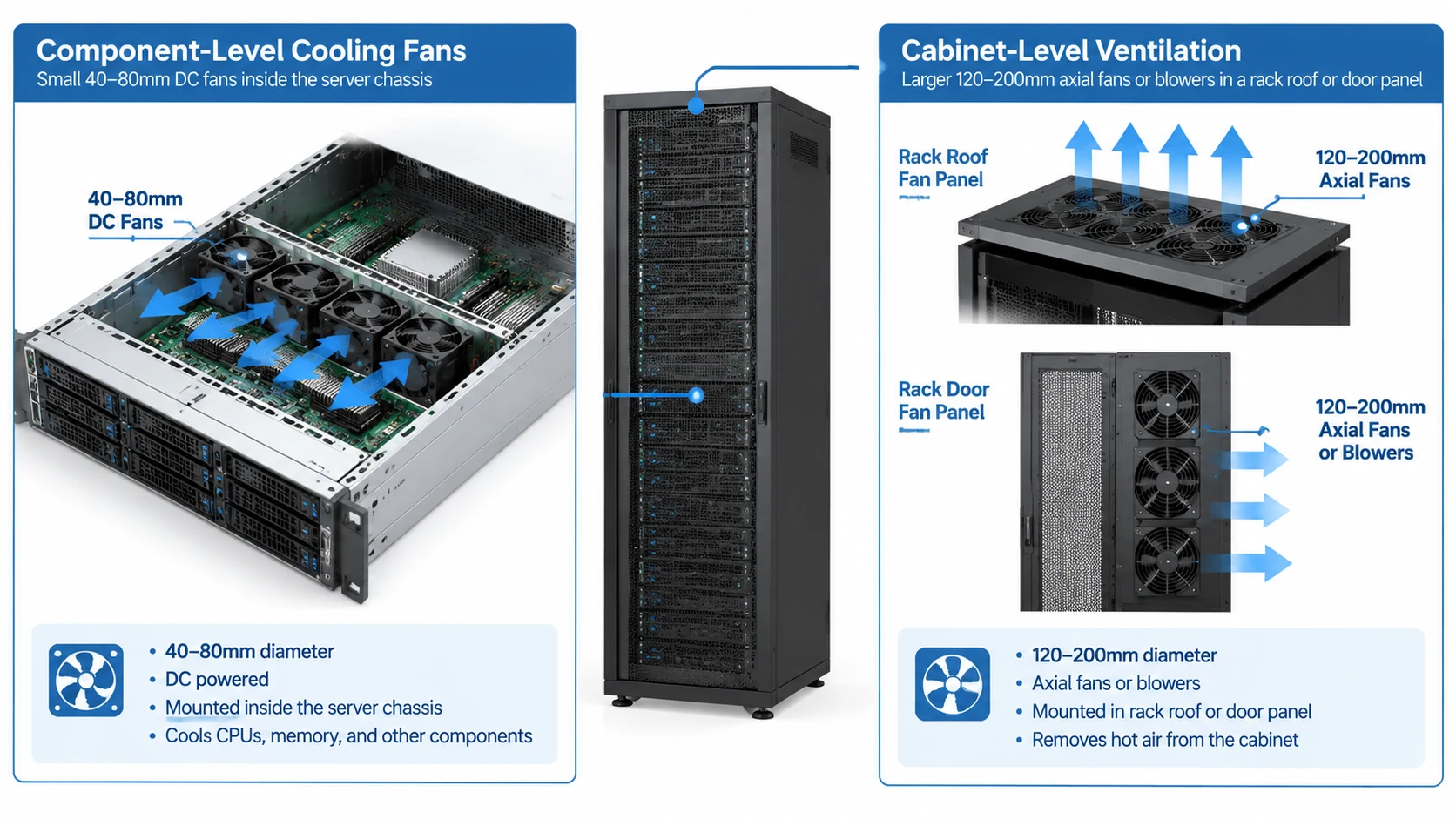
Search that phrase and half the results are 1U fan panels for the front of a rack, while the other half are 40 mm fans that sit inside a switch. They solve different problems and are usually bought from different places, so the first job is to decide which one you actually need.
Job One — Fans Inside the Equipment
These are the small axial fans mounted on a chassis wall, a heatsink or a power supply: commonly 40 mm, 60 mm or 80 mm, running on 12 V or 48 V DC. Their job is to force air across components inside a metal box, against meaningful internal resistance from heatsinks, drive cages and cable runs. This is the replacement and repair market — a fan begins to whine, its speed report turns erratic, or a chassis raises an airflow fault, and you need a part that matches the original. The deciding numbers are frame size, thickness, voltage, connector type and rated speed, not cabinet airflow. Our guide to choosing a small axial fan covers that matching process.
Job Two — Ventilating the Whole Cabinet
These are the larger fans — typically 120 mm to 200 mm axial units, or centrifugal blowers — mounted in a rack roof panel, a door, a rear wall or a plinth, moving air through the cabinet as a volume. They work against low-to-moderate pressure and are chosen on total delivered airflow. A 1U or 2U fan panel across the front of a rack, an exhaust fan for server rack fitted at the rear, or a roof kit pulling hot air up and out all belong here, as do cabinet-level blowers where the air path is restricted. To place these against the wider family of axial fans, our axial fan guide is a useful map of the types and where each is used.
A Two-Question Test: Which Duty Is Yours?
Ask two questions. Is the heat source a single box, or a whole enclosure? And can you replace the fan without opening anything upstream of it? If the answer is “one box” and “yes, it mounts to the chassis”, you are buying a component fan. If the answer is “the cabinet as a whole” and “it bolts to a panel or roof”, you are buying a cabinet-level unit. A rack can need both at once, but they are separate line items with separate sizing rules.
One scope note before going further: the sizing logic here applies to IT and server-room cabinets. An industrial electrical enclosure holding drives and switchgear raises different questions of ingress protection and filter class, and our guide to electrical cabinet cooling fan selection covers that case separately.
Requirement
Component-level fan
Cabinet-level ventilation
Where it mounts
Inside a chassis, heatsink, PSU or switch
Rack roof, door, side wall or plinth
Typical size
40–92 mm
120–200 mm axial, or centrifugal
Typical supply
12 V or 48 V DC from the host
Mains AC, or a DC bus if one exists
Sized on
Frame size, voltage, speed, connector
Total airflow against system resistance
Bought when
A fan fails or a chassis faults
A rack runs hot or a cabinet is built new
Control path
Host fan curve and BMC/tach signal
Thermostat, PWM controller or BMS
The Heat Balance: From Equipment Watts to Required CFM
Any cooling fan for server rack project starts from one relationship: a mass of moving air absorbs heat and rises in temperature by a measurable amount. Take the heat to be removed, divide by the temperature rise you are willing to allow, and you have the airflow. Everything else is correction for real-world resistance.
Step 1 — Total the Heat Load Inside the Rack
Add up the power that ends up as heat in the air path. For conventional air-cooled IT equipment, assume the great majority of nameplate power leaves as heat, so a rack of servers and switches drawing a measured load of several kilowatts is dissipating close to that same figure as heat. Where a rack has any liquid cooling, subtract the heat the liquid loop carries away and calculate airflow on the air-cooled remainder only. Metered power is a far better starting number than a nameplate sum, since nameplate figures are worst-case ratings that the equipment rarely sustains.
Step 2 — Choose an Allowable Temperature Rise
The temperature rise, usually written ΔT, is the difference between the air entering the equipment and the air leaving it. It is a design choice with consequences: a small ΔT demands more airflow and therefore more fan energy and noise, while a large ΔT lowers the airflow figure but raises exhaust and component temperatures. Confirm the limit against the equipment manufacturer’s rated maximum inlet temperature and its recommended operating range, then work backwards. A rack held to a tight inlet limit may leave surprisingly little ΔT available on a hot afternoon.
Step 3 — Apply the Airflow Formula
For a first-pass estimate at low altitude and ordinary room temperature, the forced-ventilation relationship reduces to a single line:
The table below applies that relationship. It is an estimate for preliminary sizing, calculated against free air, and the values are approximate.
Air-cooled IT load
ΔT 5 °C
ΔT 10 °C
ΔT 15 °C
1 kW
≈ 350 CFM
≈ 176 CFM
≈ 117 CFM
3 kW
≈ 1,056 CFM
≈ 528 CFM
≈ 352 CFM
5 kW
≈ 1,760 CFM
≈ 880 CFM
≈ 587 CFM
10 kW
≈ 3,520 CFM
≈ 1,760 CFM
≈ 1,173 CFM
Why Calculated CFM Is Not the Fan’s Rated CFM
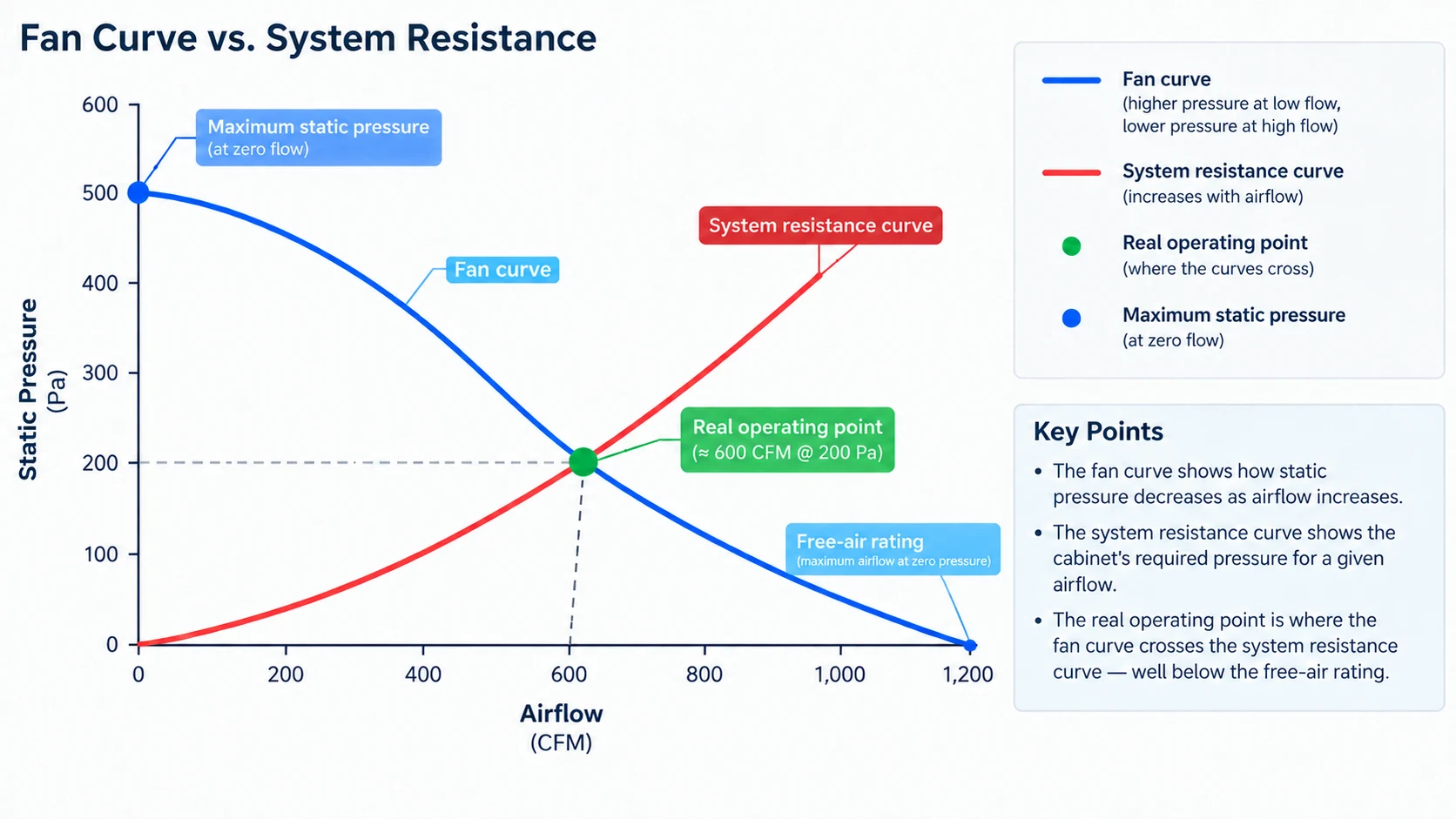
The figure from the formula is the airflow the rack needs at the operating point. It is not the number on a fan datasheet. Datasheet airflow is measured in free air, with nothing in the way, and a real cabinet always has something in the way: perforated doors, filters, cable bundles, blanking plates and the equipment’s own intake grilles. A fan quoted at a headline free-air figure will deliver noticeably less once it is pushing through a populated rack. The gap between the two is the difference between a calculation and a working installation, and it is the single most common reason a correctly sized rack still runs warm.
Why Rack Density Changes the Answer: 1U, 2U and Open Frames
The airflow relationship does not change with form factor, but the resistance the fan works against does. Higher density concentrates heat into less space and adds obstacles to the air path.
High-Density 1U and 2U Servers
A 1U chassis is the hardest case. It must dissipate high power through a shallow, densely packed box, so its internal resistance is high and the equipment’s own fans run fast and loud. In a rack full of 1U servers, the cabinet-level airflow requirement is set by the sum of those units, and the front-to-rear air path must stay unobstructed. Blanking plates in empty U positions are not cosmetic — they stop air from recirculating through the gaps and lowering cooling efficiency at the front of the rack.
GPU and Blade Racks
Accelerator and blade systems raise the heat load per rack to levels where a single roof fan kit is no longer the whole answer. Multiple fan modules, higher static pressure, and often a purpose-built ducted path become necessary. In these installations the rack’s own airflow is a design input that comes from the equipment vendor before the cabinet is ordered, and any cabinet-level fans supplement that defined path rather than replace it.
Open Frames and Two-Post Racks
An open frame has no enclosure to force air through, so there is no cabinet-level airflow to size. Cooling depends on room air movement and the equipment’s own fans. The practical risks are different: without a front door or side panels, hot exhaust air rises and recirculates into the intakes of the unit above, so consecutive open-frame racks can heat each other. A rear fan panel or a light ducting kit can help where an open frame is the only option, but containment of the aisle — not a bigger fan — is usually the effective fix.
Front-to-Rear Airflow and the Hot-Aisle / Cold-Aisle Rule
Almost all rack equipment is designed to draw cool air at the front and discharge warm air at the rear. Direction is therefore the first thing to settle in any cooling fan for server rack layout: the room has to be arranged to respect the convention, or the equipment fights the building.
The Front-to-Rear Convention
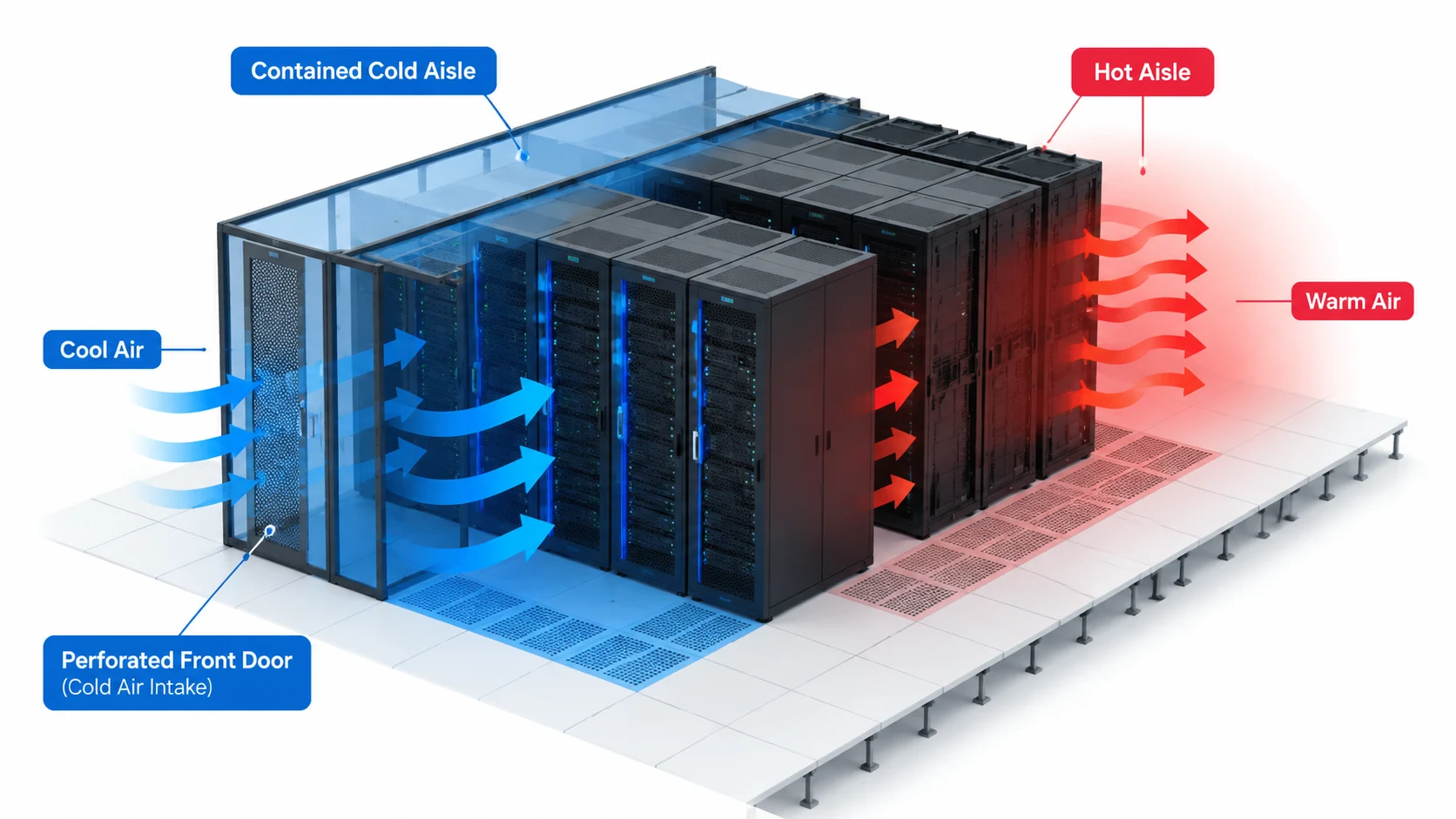
Intake at the front, exhaust at the rear. Air enters through a perforated front door or blanking-free intake face, crosses the chassis, and leaves at the back. Any cabinet-level fan should reinforce this direction: a rear exhaust fan for server rack duty pulls warmed air out of the cabinet and into the return path, while intake fans at the front feed cool air in. Mounting a cabinet fan so it blows against the equipment’s own airflow sets up a fight that reduces both flows and raises noise.
Cold Aisle, Hot Aisle and Containment
Racks are arranged in facing rows so their fronts draw from a shared cold aisle and their rears discharge into a shared hot aisle. Cold air is supplied into the cold aisle, typically from the floor or from in-row units, and hot air is collected from the hot aisle and returned to cooling plant. The moment warm exhaust is allowed to mix with the cold supply, inlet temperature rises and every fan in the room works harder for the same component temperature. Containment — doors, roof panels or full physical separation of the aisles — is what keeps the two streams apart, and it usually does more for rack temperatures than adding fans does.
What Bypass and Recirculation Do to Inlet Temperature
Two failures quietly raise rack inlet temperature. Bypass is cold air that escapes the cold aisle without passing through any equipment — through cable openings, unsealed gaps and empty U spaces — so cooling capacity is spent on air that cools nothing. Recirculation is warm exhaust air that finds its way back to the intake: over the top of the rack, around its sides, or through the space above an open frame. Both reduce the effective ΔT the fan can achieve and both are corrected with sealing and blanking, not with extra fan capacity.
AC or DC Fans for a Server Room? Reading the Trade-Off
The choice between mains AC and low-voltage DC fans is usually presented as an efficiency question. In a server room it is more often a question of what power and control wiring the cabinet actually has.
Mains AC Fans — Simple Power, Limited Control
AC fans run directly from a mains supply, which makes them easy to install where a rack has a power distribution unit but no low-voltage DC bus. They are robust and inexpensive, and for a basic exhaust or intake duty they are often sufficient. The limitations are control and monitoring: basic AC fans run at a fixed speed, so speed control requires external hardware such as a thermostat or a triac-based controller, and a tachometer output for speed monitoring is not available on every model. If a rack fan is expected to report its health back to a management system, confirm that capability before ordering.
DC Fans — Speed Control and Low-Voltage Wiring
DC fans work on a low-voltage supply, commonly 12 V or 48 V, and are designed from the start for variable speed. PWM control lets a controller hold a set point by modulating speed, which usually means quieter running at low load and a fast response when temperature climbs. Because the electronics are already on board, many DC fans provide a speed signal and a fault output for monitoring. The trade-off is the supply: a cabinet needs a DC bus or a suitable power supply, and the wiring has to be planned. Units such as our DC cooling fan range are built for this kind of speed-controlled cabinet duty.
Why the Power Source Often Decides First
If the cabinet already has a 48 V DC distribution or a low-voltage rail for monitoring equipment, DC fans integrate cleanly and their speed control is nearly free. If the rack has only mains outlets and no DC rail, adding a DC supply just to run a fan adds a component that itself can fail. That is why the honest sequence is: read the cabinet’s power architecture first, decide AC or DC second, and choose the fan model last. For the wider comparison of the two motor families, our article on AC versus DC axial fans goes into the electrical detail.
Factor
AC fan
DC fan
Supply required
Mains at the rack PDUs
12 V or 48 V DC rail or supply
Speed control
Needs external thermostat or controller
PWM control built into the fan
Speed and fault signal
Not on every model — check the datasheet
Commonly available for monitoring
Noise at part load
Fixed speed unless controlled
Slows down when heat falls
Wiring complexity
Simple, single mains feed
Needs a planned low-voltage feed
Best fit
Basic ventilation, no monitoring requirement
Managed cabinets and long racks with control and alarms
Matching the Fan to Static Pressure, Not Just CFM
A fan’s quoted airflow is only half its story. The other half is the pressure it can develop, and in a populated rack that is the half that decides whether the airflow arrives.
Reading a Fan Curve (P-Q)
A fan curve plots airflow along one axis and static pressure along the other. At one end is free-air delivery, where pressure is zero and airflow is at its maximum; at the other is the pressure at which flow stops. In between, a fan trades airflow for pressure. A real cabinet presents its own resistance curve, and the actual flow is where the two curves cross. Specifying a fan by its maximum free-air CFM is specifying the one point on the curve the installation will never reach.
Where System Resistance Comes From
Every element in the air path costs pressure: the equipment’s own intake, perforated doors, filter media, cable bundles, blanking plates that are too tight, and the fan guard itself. Guards are not neutral — a dense wire guard costs several percent of airflow, and a fan mounted against a flat panel with no clearance can lose a good fraction of its rating to turbulent re-entry.
Axial or Centrifugal for a Restricted Rack
Axial fans move high airflow at low pressure and suit open, low-resistance paths. Centrifugal blowers develop higher pressure and hold flow better when the path is restricted by filters or dense equipment. Where a rack is lightly populated, an axial cabinet fan is usually enough. Where a rack is dense or the exhaust is ducted, a blower, or an axial unit chosen on a steeper part of its curve, holds flow more reliably. Our range of cabinet cooling fans spans both approaches for panel and rack mounting.
Noise, Speed Control and the Occupied Room
In an office-adjacent rack room or a network closet, noise becomes a selection criterion rather than an afterthought. It is also the easiest criterion to get wrong, because catalog figures are measured under conditions that differ from the installation.
Why Noise Scales With the Cube of Speed
Broadly, doubling a fan’s rotating speed multiplies its airflow by roughly two, its pressure by roughly four, and the sound power it radiates by roughly eight. Small reductions in speed therefore produce large reductions in noise. Running two fans slowly rather than one fan quickly moves the same air with less noise, provided there is room to mount both. This is why speed control is a noise strategy, not only an energy strategy.
Where the Decibel Figure Is Measured
A decibel rating is only meaningful with the distance and conditions attached, because sound level falls with distance from the source. Two fans can carry very different figures simply because one was measured closer. Treat any quoted decibel number as a comparative guide measured under stated conditions, and confirm the measuring distance and free-air or in-duct condition with the manufacturer. A quiet-optimised unit, such as our small quiet DC fan, is designed with this part-load noise behaviour in mind.
Thermostat, PWM and Manual Control
Three control paths dominate. A thermostat switches fans on above a set temperature and off below it, which keeps a quiet room quiet until it needs not to be. PWM control varies speed continuously to hold a target, giving the best balance of noise and cooling. Manual control is simplest but tends to be set once and forgotten, leaving the fan running flat out in winter. For any rack in an occupied space, the first two options are usually worth the small extra cost.
Filters, Dust and the Maintenance That Keeps Airflow Honest
A filter protects the equipment and costs airflow at the same time. Left alone, it slowly reverses the airflow the rack was designed around.
What a Filter Costs You in Airflow
A clean filter adds modest resistance. A loaded filter adds a great deal more, and the fan’s delivered airflow falls with it. Because the filter sits between the clean side and the dirty side, its loading is a warning about the whole airflow path: as it clogs, the fan moves toward the steep end of its curve and delivers less. The airflow you commissioned on day one is not the airflow you have six months later unless the filter is maintained.
A Maintenance Interval That Fits the Room
There is no universal interval. A clean, filtered equipment room may need attention only a few times a year, while a rack near a loading bay or in a workshop may need it monthly. The practical approach is to set an interval from the environment, then verify it with a physical check at the filter, and shorten the interval if loading is visible earlier than expected. A simple airflow or pressure reading across the filter is the cheapest early-warning tool available.
Cleaning Fans and Clearing Cable Obstruction
When a filter is serviced, clean the fan blades and guards as well — a dust film on a blade changes its balance and its performance. Then look at the inside of the cabinet: cables bundled loosely across the front-to-rear path act as a partial filter of their own, and a bundle that has grown since commissioning can quietly cut effective airflow. Dressing cables to the sides and keeping the centre path clear is maintenance, not just housekeeping.
Redundancy and Alarming: Designing for a Fan That Stops
A fan is a moving part and moving parts fail. In a rack whose cooling depends on forced ventilation, the design question is what happens on the day one stops.
N+1 and N+N Fan Arrays
Redundancy is expressed the same way as in other infrastructure. N+1 means one more fan than the load requires, so a single failure leaves the array still meeting demand. N+N, or a fully duplicated path, tolerates the loss of a whole side. In a fan array, the remaining fans can carry on after one stops, and with speed control they can be set to increase speed to compensate, provided the array was designed with that headroom. Confirm that any compensation strategy is actually available in the controller, because a redundant fan that only ever runs at fixed speed offers less protection.
What a Tach or Alarm Output Buys You
Without a signal, a failed fan is invisible until a temperature alarm fires — or until equipment faults. A tachometer output reports actual speed, so the monitoring system can raise an alert when a fan stops or slows. Some units also provide a dedicated alarm contact for exactly this purpose. On a rack where downtime is expensive, the cost of a fan with a speed or fault signal is small next to the cost of discovering the failure through a server shutdown.
Where to Put Temperature Sensors
A single sensor rarely tells the whole story. The useful points are the cold-aisle inlet, the hot-aisle return, and one or two inside the rack so that the equipment’s own intake is measured rather than assumed. If the cabinet fan is thermostatically controlled, its sensor should sit where it senses the air the fan is handling, not against a nearby heat source that keeps it permanently at full speed.
A Worked Example: A Two-Rack Server Room
Consider a small equipment room serving an office: two 42U racks, each holding mixed servers, switches and a UPS, in a room with a dedicated cooling unit and no full containment.
Step 1 — Size the Airflow
Start from measured load. Suppose each rack draws around 3 kW of IT power, so each is dissipating approximately 3 kW as heat. If the equipment is rated for a maximum inlet well above a normal room temperature, and the room can hold inlet within a controlled range, a working ΔT of around 10 °C is a reasonable design target. From the table, 3 kW at 10 °C needs roughly 528 CFM of airflow per rack at the operating point. Because the racks are not contained and the air path is imperfect, add a practical allowance on top — a margin on the order of a small percentage for filter loading and bypass. Confirm the final figure against the equipment manufacturer’s airflow data rather than the estimate alone.
Step 2 — Read the Room, Not Just the Rack
Before choosing a fan, look at how the room behaves. If warm air from the rack rears drifts back over the tops and around the sides, the rack inlet temperature will be higher than the room thermostat suggests, and no amount of extra fan capacity fixes recirculation. Sealing cable openings, fitting blanking plates and, where possible, arranging the racks to face a common cold side will raise the achievable ΔT more cheaply than a larger fan array.
Step 3 — Fix Direction, Fan Type and Redundancy
With the airflow known, the choices fall into place. Direction follows the equipment: cool air in at the front, warm air out at the rear, with any cabinet fan assisting that path near the top of the rack where warm air collects. Fan type follows the resistance: axial units suit these lightly populated racks, while a blower would be considered only if a filter or a duct added significant restriction. Redundancy follows the consequence of failure: for two racks serving an office, an N+1 arrangement on each, with a speed or fault signal back to the monitoring system, gives a sensible balance between cost and protection. Where a rack is lightly loaded or the room is already well contained, a simpler configuration may be justified.
Frequently Asked Questions
How much airflow does a server rack need?
It depends on the heat load and the temperature rise you allow, and it is calculated rather than guessed. For a first estimate, use airflow (CFM) ≈ 1.76 × heat load (W) ÷ ΔT (°C). A rack dissipating 3 kW at a 10 °C rise works out to roughly 528 CFM at the operating point. That figure is only the starting point — the selected fan must deliver it against the rack’s real resistance, not in free air, so confirm the final number against the manufacturer’s data.
Should a rack cooling fan blow in or pull out?
Match the fan to the equipment, which almost always draws in at the front and exhausts at the rear. A cabinet-level fan should reinforce that: exhaust duties near the top of the rack, where warm air accumulates, and intake duties feeding cool air to the front. A fan blowing against the equipment’s own airflow reduces both flows and adds noise. Verify the installed direction with a quick check rather than trusting the label, and confirm the rack still runs cool after the door is closed.
Are AC or DC fans better for a server cabinet?
Neither is universally better. AC fans suit cabinets that have only mains outlets and need no monitoring, because they are simple to power. DC fans suit cabinets that already have a low-voltage rail, because speed control, quieter part-load running and speed or fault signals are built in. The deciding factor is usually the cabinet’s power architecture, so read that first and choose the fan family second.
How many rack fans do I need for redundancy?
Size the array so its normal duty meets the calculated airflow, then add at least one fan for N+1 protection, or duplicate the path where a single failure is unacceptable. Check that the controller can raise the remaining fans’ speed to compensate when one stops; a redundant fan that cannot increase its output offers limited protection. Match fan models within an array so the remaining units share the load predictably.
How often do rack fan filters need cleaning?
Set the interval from the room rather than from a generic schedule. A clean, filtered equipment room may need attention only a few times a year; a rack near a loading bay or in a workshop may need it monthly. Check the filter at each visit, replace rather than merely tapping dust out of the media, and shorten the interval if loading is visible sooner than expected.
What to Confirm Before You Order
Work in a fixed order and the cooling fan for server rack decision becomes straightforward. First decide which duty you are buying — a component fan for a piece of equipment, or a cabinet-level ventilation fan for a whole rack. Then convert heat load into a required airflow with a stated ΔT. Then subtract the room’s problems: recirculation, bypass and uncontained aisles raise inlet temperature, and fixing them is often cheaper than oversizing a fan. Choose AC or DC from the cabinet’s power architecture, not from a preference. Select the fan on its pressure-airflow curve at the resistance the rack will actually present, not on its free-air rating. Finally, build in the redundancy and the speed or fault signal that match the cost of a failed fan in your environment — and confirm every number against the equipment and fan manufacturers’ data before you buy.
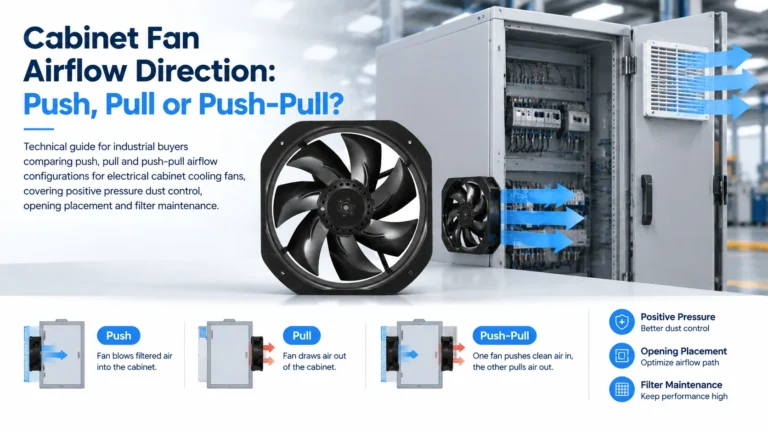
Choosing cabinet fan airflow direction: why positive pressure protects a control panel from dust, when to reverse the fan, and how to verify it on site.
Engineering guide to electrical cabinet cooling fan selection: heat-load formula, airflow calc, AC vs DC, IP rating, selection checklist, filter fan vs heat exchanger vs A/C.